
Phishing emails rarely look like spam. They imitate booking platforms, banks and delivery services, and many pass basic filters. phywall adds a focused layer on top of Rspamd: phishing phrase lists in 16 languages across 12 sectors, URL feeds from OpenPhish and PhishTank, and combined rules that raise the score only when a suspicious link and phishing text appear together.
A typical first run, step by step, exactly as you would type it in your terminal.
phywall is a command-line toolkit that strengthens phishing protection on mail servers running Rspamd and Dovecot. It was built and tested on real production mail servers, works with the configuration you already have, and follows one simple rule: every change is previewed first, and nothing leaves your server without your approval.
Modern phishing does not look like classic spam. It copies the emails of booking platforms, banks, couriers and webmail providers, comes from freshly registered domains and often passes standard filters. Rspamd is a powerful filter, but out of the box it does not know which phrases attackers use against a hotel, a bank or a logistics company. phywall fills that gap with curated, sector-specific phishing data and rules designed to keep false positives low.
phywall adds three signals to Rspamd: PHISH_URL (a link found in the phishing URL list), PHISH_TEXT (a phishing phrase in the message body) and PHISH_SUBJECT (a phishing phrase in the subject). Each signal scores 0 on its own, so a single matching phrase or a shared link never punishes a legitimate sender.
Points come only from combinations:
When scanning mailboxes, messages that match the strong rules are moved to Junk. A message that matches only Rspamd's weak PHISHING symbol is moved only if its score is 3.0 or higher; otherwise it is reported as suspicious so you can decide.
Map files are stored in /etc/rspamd/maps/phishing/: one shared urls.map and one phrase file per sector in text/. phywall removes trailing whitespace from every map file, because Rspamd 4.x silently ignores such lines.
The common phrase list is always installed. On top of it you can add one or more of these sectors: hotel, travel, finance, logistics, ecommerce, manufacturing, healthcare, education, government, legal and it.
A typical first run takes only a few commands. Each step shows a preview before anything changes.
# 1. See the available sectors
phywall configure --sectors

# 2. Preview the Rspamd changes (nothing is written)
phywall configure --sector hotel,finance

# 3. Apply them
phywall configure --sector hotel,finance --apply

# 4. Check a mailbox, then move phishing to Junk
phywall scan [email protected]
phywall scan [email protected] --move

# 5. Review and send anonymized reports
phywall contribute
phywall contribute --applyPrepares Rspamd for phywall. It installs the phrase maps for the selected sectors, the shared URL map and the rules, and enables the OpenPhish and PhishTank feeds. Rules are appended as clearly marked blocks to local.d/multimap.conf and local.d/composites.conf, so your own settings are never touched. A backup is taken first, and if something goes wrong the change is rolled back automatically.
phywall configure --sectors                         # list sectors
phywall configure --sector hotel,finance            # dry run: show what would change
phywall configure --sector hotel,finance --apply    # install maps, rules and feeds
phywall configure --rollback # remove phywall blocksChecks a mailbox for phishing that has already been delivered. The Inbox is scanned and, with --move, phishing is moved to Junk. The Sent folder is always checked in report-only mode, which helps you spot phishing that staff forwarded to colleagues. Findings are cleaned and saved to the local contribution queue, ready for you to review.
phywall scan [email protected]           # dry run: check Inbox and Sent, move nothing
phywall scan [email protected] --move # move phishing from Inbox to JunkTrains Rspamd's Bayes filter from real mail on your server. Ham is learned only from Sent and spam only from Junk; the Inbox is never used, because it often contains unwanted marketing mail. You can train a whole domain or a single mailbox, limit training to recent mail with --days and skip mailboxes with --exclude. Sent messages that trigger a phishing rule are not learned; they are listed as suspicious instead.
phywall learn example.com                             # dry run for the whole domain
phywall learn [email protected] --learn                # train from one mailbox
phywall learn example.com --learn --days 30           # only mail from the last 30 days
phywall learn example.com --learn --exclude info,sales # skip some mailboxesSends anonymized phishing reports to the Develust API so the phrase lists and rules can improve over time. Without --apply it only shows what would be sent. Duplicate messages are grouped as copies, and large queues are sent in parts.
phywall contribute                 # preview what would be sent
phywall contribute --apply         # send anonymized reports
phywall contribute --clear         # delete the local queue (asks first)
phywall contribute --clear --yes # delete without askingphywall checks for and installs new versions from official GitHub releases only. Changes pushed to the repository never reach your servers until they are published as a release.
phywall update                     # check for a new release
phywall update --apply             # install it
phywall uninstall                  # remove phywall (asks first)
phywall version
phywall helpRunning phywall contribute and reviewing the preview is your opt-in; there is no hidden background sending. Before a report is queued, phywall cleans it:
Each report contains the phishing sender address, the score and the rules that matched, which is what is needed to write better rules. Server information such as hostname, IP address or mailbox names is never sent or logged. Each server uses one anonymous token, stored on the API only as a SHA-256 hash. You can delete all local contribution data at any time with phywall contribute --clear.
Download the latest release from the GitHub releases page and follow the instructions in the README. phywall installs to /opt/phywall and adds the phywall command to /usr/local/bin. Run phywall help to see all commands.
phywall is open source under the MIT license. Found a false positive or a phishing email that was missed? Open an issue on GitHub using the dedicated templates. Security vulnerabilities can be reported privately through GitHub's private vulnerability reporting or by email to [email protected]; the PGP key fingerprint is listed in SECURITY.md.
Source code and releases: github.com/develust/phywall
Answers to common questions about how our tools work, what they change on your server, and how your data is handled.
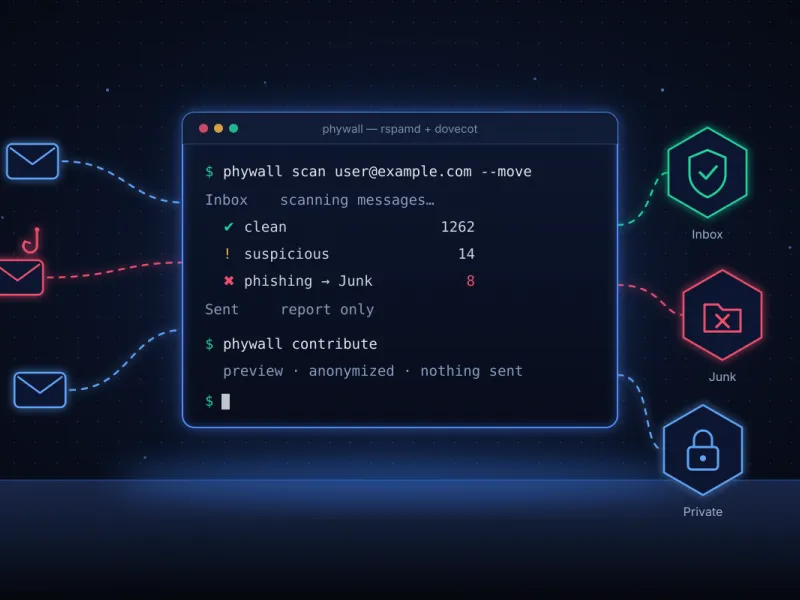
phywall is a free, open-source phishing defense toolkit for administrators of mail servers that run Rspamd and Dovecot. It adds sector-specific phishing rules to Rspamd, scans existing mailboxes and moves phishing to Junk, trains the Bayes filter from your own mail, and helps improve detection through anonymized reports. It suits hosting providers, agencies and companies that run their own mail servers.
No. phywall writes only its own clearly marked blocks to local.d/multimap.conf and local.d/composites.conf and installs its map files in a separate folder. Every change is shown as a dry run first, a backup is taken before applying, and if something goes wrong the change is rolled back automatically. You can remove all phywall rules at any time with phywall configure --rollback.
Its signals score zero on their own: a phishing phrase or a listed link alone never adds points, so legitimate senders are not punished. Points are added only when signals appear together, for example a phishing link plus phishing text. During mailbox scans, messages that match only Rspamd's weak PHISHING symbol are moved only with a score of 3.0 or higher; otherwise they are marked as suspicious for you to review.
Only phishing data, and only after you preview it and run phywall contribute --apply. Reports contain the phishing sender address, the score and the rules that matched. Recipient addresses and your own domains are replaced with placeholders, links are reduced to host names and long numbers are masked. Hostname, IP address and mailbox names are never sent or logged.
phywall works with Rspamd and Dovecot using Maildir storage in /var/mail/vhosts/domain/user/ with Junk and Sent folders. It is written in Bash only, so the server does not need Python or git. It has been tested on AlmaLinux 9 with Rspamd 4.2.2; other distributions with the same layout are not officially tested yet.
Yes. phywall is open source under the MIT license, and the code is available on GitHub at github.com/develust/phywall. Updates come only from official GitHub releases: phywall update checks for a new version and phywall update --apply installs it. Changes pushed to the repository never reach your server until they are published as a release.